The short version
- monday CRM is flexible, visual and easy for a team to adopt, especially if you already use monday.com for projects.
- The gaps show up around phone calls (there is no built-in dialer), duplicate contacts and sales reporting that needs careful board design.
- Most of those gaps close with good board setup and a phone system connected through monday’s API.
monday CRM is the sales product built on monday.com’s boards. Teams like it because it looks and works like the rest of monday: items, columns, automations and dashboards. That flexibility is also where teams go wrong, because a CRM needs more structure than a project board.
 monday CRM
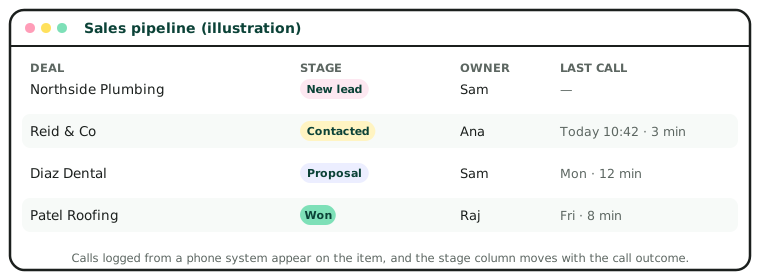
What monday CRM does well
- Adoption. If your team already uses monday.com, they already know how to use the CRM.
- Visual pipelines. Kanban views, colour-coded stages and simple drag-and-drop.
- Automations. “When status changes to Won, notify finance” style rules without code.
- Sales and delivery on one platform. Won deals can flow into project boards for onboarding or delivery.
Where it needs help
| Gap | Why it matters | How teams close it |
|---|---|---|
| No built-in dialer | Calls happen elsewhere and the board never shows them | Connect a phone system such as JustCall, Zoom Phone or Aircall |
| Duplicate contacts | Phone numbers and emails are typed in many formats | Clean formats and match before creating items |
| Sales reporting | Reports are only as good as the board structure | Design boards and columns for reporting from the start |
| Automation limits | Automation and integration actions are counted monthly by plan | Use them for what matters; move heavy syncing to the API |
About prices: CRM vendors change prices and plans often, and show different prices by region and billing period. Check the vendor’s own pricing page before you buy. We note the date we last checked at the end of each post.
Setting up monday CRM for sales
- Separate boards for leads, contacts, accounts and deals, linked with connect-board columns, rather than one giant board.
- One status column per board that means one thing, with a fixed list of values.
- A phone column in one format, with the country code, so calls can be matched.
- Dates that drive follow-up: a “next call” date column and an automation that notifies the owner.
Connecting monday CRM: the API basics
monday.com uses a GraphQL API rather than REST, which means one endpoint and queries that describe exactly what you want back.
| Endpoint | POST https://api.monday.com/v2 |
| Authentication | A personal API token or an app’s OAuth token in the Authorization header |
| Find an item by phone | Query items_page_by_column_values on the phone column |
| Create a lead | Mutation create_item with column_values as JSON |
| Log a call | Mutation create_update on the item, plus change_column_value for the stage |
| Limits | Requests are limited by query complexity per minute; check monday’s developer docs |
Is monday CRM right for you?
It is a strong choice if your team already lives in monday.com, or if sales hands over to delivery work that you also track there. If your sales are mostly phone-based and high volume, plan the phone integration from the start, or consider a CRM with calling built in.
Plans and features last checked November 2026.