The short version
- Most Salesforce duplicate problems start with marketing tools that create a new lead every time someone fills in a form.
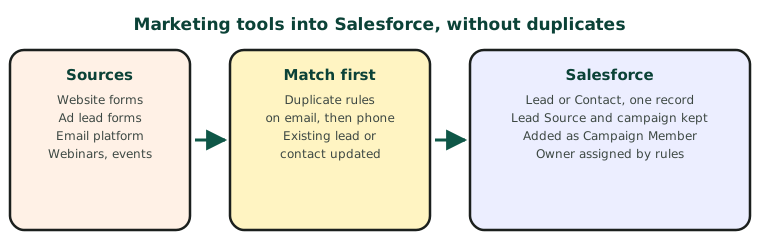
- Fix it with three things: duplicate and matching rules, a clear lead-versus-contact decision, and campaigns that record where each person came from.
- Connect each source through its native integration where it exists, or the Salesforce API with a match-then-create pattern.
Salesforce is excellent at managing a sales process and poor at forgiving messy inputs. Connect a few marketing tools carelessly and within months you have the same person as three leads and a contact, campaign reports that do not add up, and reps calling people who are already customers.
 Salesforce
 HubSpot
Where marketing leads come from
| Source | Usual connection | Common problem |
|---|---|---|
| Website forms | Web-to-Lead, a form plugin, or the API | Every submission creates a new lead |
| Ad lead forms (LinkedIn, Meta, Google) | Native lead sync or a connector | No campaign or source recorded |
| Email marketing platform | Native sync with Salesforce | Two-way sync overwrites fields |
| Webinars and events | Native integration or CSV import | Imports create duplicates in bulk |
Step 1: Duplicate and matching rules
Salesforce has built-in matching rules and duplicate rules in Setup. Turn them on for leads and contacts, matching on email first and phone second. Decide whether a duplicate should be blocked or allowed with an alert. For automated sources, allowing with a report is usually safer than blocking, so no lead is lost.
Step 2: Lead or contact?
Agree one rule: if the person already exists as a contact, update the contact and add them to the campaign; if not, create a lead. Many duplicate problems come from tools that only ever create leads.
Step 3: Keep the source and the campaign
- Set Lead Source on creation, and never overwrite it.
- Add the person as a Campaign Member of the campaign they responded to, every time they respond.
- Keep UTM values from your website in their own fields.
Step 4: Route to the right owner
Use lead assignment rules so every new lead has an owner within minutes, and notify them. A lead without an owner is a lead nobody calls.
For developers: the Salesforce API pattern
| Authentication | OAuth 2.0 through a Connected App, with a dedicated integration user |
| Find existing records | SOQL through GET /services/data/vXX.X/query?q=…, searching Lead and Contact by email |
| Create a lead | POST /services/data/vXX.X/sobjects/Lead |
| Update a contact | PATCH /services/data/vXX.X/sobjects/Contact/{id} |
| Add to a campaign | POST /services/data/vXX.X/sobjects/CampaignMember |
| Several steps at once | The Composite API, to save calls against your daily API limit |
Replace vXX.X with your org’s current API version.
A checklist before you connect a new source
- Duplicate and matching rules are on for leads and contacts.
- The tool matches existing contacts, not only leads.
- Lead Source is set once and never overwritten.
- Responses are added to a campaign.
- A test submission with an existing customer’s email updates them instead of creating a lead.