The short version
- An AI voice agent is only useful if it knows who it is calling and your CRM learns what happened.
- The pattern is the same for Retell AI, Vapi and Bland AI: a CRM event starts the call, the agent gets context, a webhook returns the transcript and outcome, and the CRM updates.
- Consent and calling rules apply to AI calls. Build them in before the first call goes out.
AI voice agents can answer calls around the clock, qualify new leads in minutes and confirm appointments. On their own, though, they are a clever phone call with no memory. Connected to your CRM, they become part of your sales process. This guide explains how that connection works, for the three agent platforms we set up most often.
 Retell AI
 Vapi
 Bland AI
 HubSpot
 GoHighLevel
 Salesforce
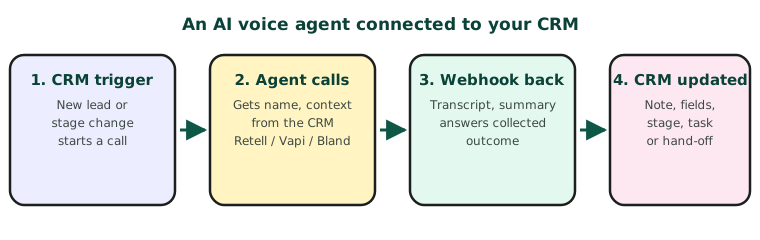
What an AI agent can do for a sales team
- Speed to lead. Call a new website enquiry within a minute, even at 9pm.
- Qualify. Ask the three or four questions your best rep asks, and record the answers.
- Book. Offer real calendar slots and book the meeting.
- Answer overflow and after-hours calls, and hand urgent ones to a person.
The three platforms, compared
| Retell AI | Vapi | Bland AI | |
|---|---|---|---|
| Style | Agents built in a dashboard, with conversation flows | Developer-first, highly configurable | Pathways: the call follows a branching map |
| Start an outbound call | POST /v2/create-phone-call |
POST /call |
POST /v1/calls |
| Pass CRM details in | Dynamic variables | Assistant overrides and variable values | Request data used in the pathway |
| Results back | Webhooks such as call_ended and call_analyzed |
Server URL messages, including the end-of-call report | A webhook URL on the call |
| Best for | Teams wanting a fast, managed setup | Custom builds and complex tools | Scripted, branching conversations |
Endpoint paths are from each platform’s API reference; check the current versions before building.
What to pass into the call
The opening few seconds decide whether a call goes well. Pass the agent the contact’s first name, why you are calling (the form they filled in, the quote they asked for), their time zone and anything they have already told you. Never pass more personal data than the conversation needs.
What should come back to the CRM
| From the call | Where it goes in the CRM |
|---|---|
| Outcome (booked, interested, not interested, wrong number) | A field or stage change, which your CRM automations can act on |
| Summary and transcript link | A note or call activity on the contact |
| Answers collected (budget, timing, service needed) | Their own fields, so you can report on them |
| A request for a person | A task for the owner, or a live transfer |
Rules to build in first
- Consent. In the US, AI-generated voice calls are treated as artificial-voice calls under the TCPA, which generally needs prior express consent, especially for calls to mobiles. Other countries have their own rules. Get advice for your situation.
- Calling hours in the contact’s time zone.
- Opt-outs honoured immediately, in the CRM as well as the agent platform.
- Disclosure that the caller is an AI assistant, where required, and good practice everywhere.
A sensible first project
Start with one job: calling new inbound leads within five minutes, during business hours, to book a call with a person. Measure booked calls for a month. Then add after-hours answering or re-engagement calls.