The short version
- CallTools records calls, lets managers listen in and whisper to agents, and has its own built-in contact management.
- It lists more than 40 direct integrations, including Salesforce, HubSpot, Zoho, Pipedrive, Microsoft Dynamics and Keap, plus Zapier, webhooks and an API for the rest.
- Most teams still keep their main CRM and sync CallTools to it. The work is in mapping dispositions, recordings and contacts so nothing lands in the wrong place.
CallTools is a call-centre dialer built for teams that make a lot of outbound calls: predictive, power, preview, progressive and parallel dialing in one platform. When teams look at it, three questions come up again and again. Does it record calls? Does it have a CRM of its own? And will it work with the CRM we already use? Here are the answers, and what to check before you rely on them.
Call recording and coaching
Call recording is a standard agent feature in CallTools, listed alongside agent scripts and call coaching. Coaching means a manager can listen to a live call and whisper to the agent without the customer hearing, which is how most call floors train new agents on real calls instead of role-play.
Two things are worth deciding before you switch recording on everywhere:
- Consent rules. Recording laws differ. Some US states require every party on the call to agree to being recorded, and many countries have their own rules. Decide which campaigns record, and make sure the disclosure your agents use matches where you call.
- Where recordings end up. A recording inside the dialer is useful to a team lead. A recording linked from the customer record in your CRM is useful to everyone who deals with that customer later. Decide which you need.
Lead management: the built-in CRM
CallTools includes contact management, so it works on its own as a simple CRM for calling teams. Agents see the contact record and its history during the call, and scripts can pull in details from that record, so each agent sees a version of the script with the name and details of whoever just answered.
Every outbound call is also logged automatically, with the time, the caller ID used, the agent, the campaign and the outcome. That log is the backbone of reporting and of any compliance review.
For a team that only calls, that may be enough. Most growing businesses, though, have sales, marketing or service work that lives in another CRM. That is where integration comes in.
CRM integrations: what connects and how
CallTools lists more than 40 direct integrations. Among them are the CRMs most small and mid-sized teams use:
| Type | Examples |
|---|---|
| Direct CRM integrations | Salesforce, HubSpot, Zoho, Pipedrive, Microsoft Dynamics, Keap |
| Other direct integrations | Google Sheets, Slack, Shopify, and call-tracking tools such as Ringba and Retreaver |
| No-code connections | Zapier, for thousands of other apps |
| Custom connections | Webhooks that fire on events such as a new disposition or a new calendar entry, and an API with tokens scoped to a user and its permissions |
If your CRM is not on the direct list, for example GoHighLevel, webhooks and the API are the reliable route. Zapier works for simple cases but adds a monthly, per-task cost and another place for things to break.
How a call reaches your CRM
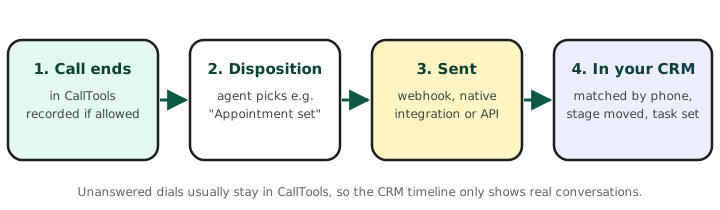
Whichever route you use, a connected call follows the same path. The call ends, the agent picks a disposition, and that event is passed to your CRM, where it is matched to the contact and starts the next step.
The CallTools API, for custom integrations
When a CRM is not on the direct integration list, or you need more control than a native connector gives you, the CallTools REST API covers almost everything in the platform. The reference is public on SwaggerHub (version 2.1 at the time of writing), and these are the basics a developer needs:
| Base address | https://app.calltools.io/api/ |
| Authentication | An API key in the request header: Authorization: Token your-key. Keys are created in the CallTools web interface. JWT is also offered for app developers. |
| Permissions | Each key belongs to one user and has exactly that user’s permissions. Calling an endpoint the user cannot access returns 403. Create a dedicated integration user with only what it needs. |
| Paging | Lists are paged: ?page=1&page_size=100 |
| Rate limit | 1,000 requests per hour, so sync in batches and rely on webhooks for real-time events. |
The endpoints a CRM integration usually needs
| Endpoint | What it is for |
|---|---|
GET /contacts/, POST /contacts/, PATCH /contacts/{id}/ |
Find, create and update contacts, for example pushing new CRM leads into CallTools. Bulk update and bulk delete endpoints exist too. |
GET /contacthistory/{id}/ |
The full history of one contact. |
GET /calls/, GET /calls/{id}/ |
Call records, filterable by contact, agent, campaign, disposition and date. Each call carries its start and end time, duration, direction, disposition and a reference to its recording file. |
GET /calltranscripts/ |
Call transcripts. The calls list can also be searched by transcript text. |
GET /calldispositions/ |
Your list of dispositions, to map each one to an outcome in the CRM. |
GET /campaigns/, /campaignmembers/ |
Campaigns, and which contacts or lists are in them. |
/contacttags/, /contactfields/ |
Tags and custom fields, so CRM data has somewhere to land. |
/donotcontact/, /donotsms/ |
Do-not-call and do-not-text lists, for keeping opt-outs in sync with the CRM. |
/sms/, /calendarevents/, /callbackqueues/ |
Texts, booked appointments and call-back queues. |
A sensible pattern is webhooks for things that need to happen now, such as a new disposition or a booked appointment, and the API for everything else: pushing new leads into campaigns, nightly checks that nothing was missed, and keeping do-not-contact lists the same in both systems.
What should sync, and what should not
A good CallTools to CRM connection is a set of decisions, not a switch. These are the ones that matter most:
- Dispositions. Each CallTools disposition should mean one thing in the CRM. “Appointment set” might move a deal stage and stop follow-up emails. “Call back” might create a dated task. Agree the list before connecting anything.
- Recordings. Link the recording from the call activity on the CRM contact, so nobody has to search the dialer for it.
- Contact matching. Match on a cleaned-up phone number. If one system stores +1 (555) 014-2290 and the other 5550142290, every returning caller becomes a duplicate.
- What not to send. A predictive dialer makes many attempts per conversation. Unanswered dials and machine-detected calls usually should not flood the CRM timeline.
- Lists going the other way. If your leads start in the CRM, decide which views or stages feed CallTools campaigns, and how often.
A quick checklist before you rely on it
- Recording is on only for the campaigns that should record, with the right disclosure.
- Every disposition has an agreed action in the CRM.
- A test call from each campaign lands on the right contact, with the outcome and recording link.
- A caller who is not in the CRM is matched or created correctly, not duplicated.
- Someone is alerted if the integration stops sending.
If you would rather not wire this up yourselves, we set up CallTools and connect it to Salesforce, HubSpot, GoHighLevel and other CRMs as a one-time setup, tested on real calls.