The short version
- HubSpot’s free CRM is a real CRM, not a trial: contacts, companies, deals, tasks, forms and email tracking, at no cost.
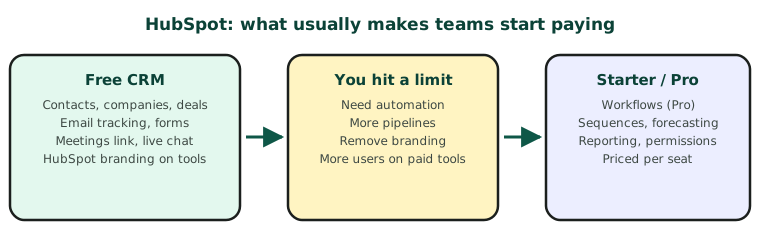
- Teams usually start paying for one of four reasons: automation, more pipelines, removing HubSpot branding, or reporting and permissions.
- The free CRM can be connected to your website and phone system through HubSpot’s API, so you can get a long way before paying.
HubSpot is one of the few CRMs with a free plan that small businesses genuinely run on. The question is not whether it is good enough to start, but what will make you upgrade, and when. Knowing that up front lets you set it up so the upgrade, if it comes, is painless.
 HubSpot
About prices: CRM vendors change prices and plans often, and show different prices by region and billing period. Check the vendor’s own pricing page before you buy. We note the date we last checked at the end of each post.
What the free CRM includes
- Contacts, companies, deals and tasks, with a sales pipeline.
- Forms for your website, with submissions landing on the contact.
- Email tracking and templates, and a meetings booking link.
- Live chat and a basic shared inbox.
- Basic reporting dashboards.
The limits small teams hit first
| You want to… | Free CRM | Usually needs |
|---|---|---|
| Send automatic follow-ups and create tasks from rules | Very limited | Professional (workflows) |
| Run sales email sequences | No | Sales Hub Professional |
| Run more than one sales pipeline | Limited | Starter or above |
| Remove HubSpot branding from forms, chat and emails | No | Starter or above |
| Control who sees and edits what | Basic | Professional |
| Forecasting and custom reports | Basic dashboards | Professional |
The big step is Professional, because automation lives there. It is priced per seat, so cost grows with your team. Check the current tier contents on HubSpot’s pricing page, as features move between tiers over time.
Setting up the free CRM so it scales
- Pipeline stages that match how you sell. Five to seven stages, each with a clear exit rule.
- Clean properties. Decide your lead source, owner and status fields before importing anything.
- One way in for leads. Send every website enquiry through a HubSpot form or the API, so nothing lives in an inbox.
- Calls logged. Connect your phone system, so call history sits on the contact from day one.
Connecting the free CRM: the API basics
HubSpot’s CRM API is available on free accounts. For most small-business integrations you will use:
| Authentication | A private app access token, sent as Authorization: Bearer …, with only the scopes you need |
| Find before creating | POST /crm/v3/objects/contacts/search on email or phone |
| Create or update a contact | POST /crm/v3/objects/contacts, PATCH /crm/v3/objects/contacts/{id} |
| Deals | POST /crm/v3/objects/deals, then associate it with the contact |
| Log a call | POST /crm/v3/objects/calls, associated with the contact |
| Real-time changes | Webhooks through a HubSpot app |
Requests are rate limited per app. Check HubSpot’s developer docs for the current limits for your account.
When it is worth paying
Pay when automation saves more time than it costs. A useful test: if someone on your team spends more than an hour a day on follow-ups, task creation or copying details between tools, Professional usually pays for itself. If not, a well-set-up free CRM with your website and phones connected is often all a small team needs.
Plans and features last checked November 2026.