The short version
- Zoho CRM has a free edition for up to 3 users, then four paid editions priced per user: Standard, Professional, Enterprise and Ultimate.
- Most small sales teams land on Standard or Professional. The features that usually force the choice are workflow automation, Blueprint (process control) and how many custom modules and reports you need.
- Budget for setup as well as licences: a well-configured Standard edition beats a messy Enterprise one.
“How much does Zoho CRM cost?” has a short answer and a useful one. The short answer is on Zoho’s pricing page, per user per month, and it changes by region and billing period. The useful answer is which edition your team needs, because that is where most small businesses overspend or end up stuck.
 Zoho CRM
About prices: CRM vendors change prices and plans often, and show different prices by region and billing period. Check the vendor’s own pricing page before you buy. We note the date we last checked at the end of each post.
The editions, in plain English
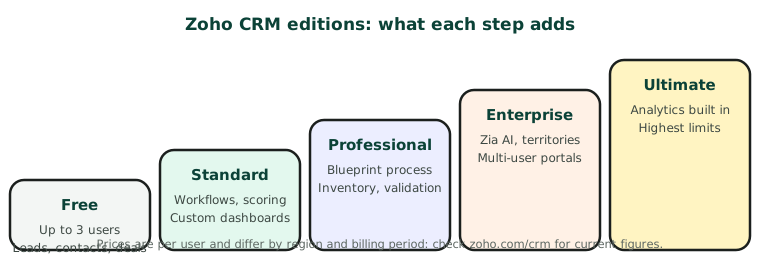
| Edition | Who it suits | What it adds |
|---|---|---|
| Free | A founder and up to 2 others, testing the waters | Leads, contacts, deals, documents and the mobile app, for up to 3 users |
| Standard | Small sales teams starting to automate | Workflow rules, scoring rules, custom dashboards, mass email |
| Professional | Teams that want a consistent sales process | Blueprint process management, validation rules, inventory management |
| Enterprise | Larger or multi-team organisations | Zia AI assistant, territory management, portals, sandbox |
| Ultimate | Data-heavy teams | Built-in advanced analytics and the highest limits |
The features that usually decide the plan
- Automation. If you want follow-up tasks, emails or field updates to happen on their own, you need at least Standard.
- Blueprint. If you want the CRM to enforce your sales steps (for example, a deal cannot move to “Proposal” without a quote attached), you need Professional.
- Territories and multiple teams. If different regions or teams must see different records, look at Enterprise.
- Limits. Custom modules, fields, reports and API calls all rise by edition. Check the limits that matter to you on Zoho’s comparison page.
Monthly or yearly billing
Zoho, like most CRMs, charges less per user when you pay yearly. If your team size is still changing, a monthly plan costs more but lets you add and remove users as you go. Many teams start monthly for a quarter, then switch to yearly once headcount settles.
Costs that are easy to forget
- Setup. Modules, fields, layouts, pipeline stages and rules. Done once, properly, it saves months of clean-up.
- Data import. Moving contacts and deals from spreadsheets or another CRM, without creating duplicates.
- Phone and email. Zoho Voice, or a dialer such as Aircall, Dialpad or RingCentral, is priced separately.
- Integrations. Connecting your website forms, calendar and phone system.
For developers: the Zoho CRM API
Zoho CRM has a REST API on every paid edition, with daily call limits that rise by edition and number of users. A few things trip people up:
| Authentication | OAuth 2.0. Access tokens expire after an hour and are refreshed with a refresh token. |
| Region | Zoho runs separate data centres. Use your account’s domain, for example zohoapis.com, zohoapis.eu or zohoapis.in. |
| Records | GET / POST / PUT /crm/v{version}/Leads, and the same pattern for Contacts, Deals and custom modules |
| Search | GET /crm/v{version}/Contacts/search?phone=… or ?email=…, to match before creating |
| Real-time changes | Notification API (watch) or workflow webhooks |
Check Zoho’s API reference for the current version number and your edition’s limits before you build.
Which edition we usually recommend
For a team of two to ten people selling one service: start on Standard, set it up properly, and move to Professional when you want Blueprint to enforce your process. Very few small businesses need Enterprise in their first year.
Editions and features last checked November 2026. Prices: see zoho.com/crm for your region.